While it might seem all the same, accounting for small business creates a unique situation for the business in question. Accounting often involves meticulousness of time; going over documentation and reconciling multiple reports to ensure that everything checks quality standards. However, for owners of small businesses, time may occasionally feel like a scarce resource. Especially when having to deal with other business-related functions. What’s worse, the lack of time increases the chances of human error, which introduces the risk noncompliance and unwarranted penalties.
For businesses seeking to reduce the burden of filing, recording, and managing their accounting, cloud-based small business accounting is the simplest and most secure solution. Automating the maintenance of the accounting process improves efficiency and accuracy. It also provides a higher level of data security and a streamlined approach to accounting. This saves business owners valuable resources and time that they can invest in their core activities.
However, with all the benefits that cloud-based accounting offers, the best approach for businesses is to develop a holistic understanding of how it works. This is especially important when you consider how it safeguards data security. It also helps businesses gain a transparent view of the specific benefits they can achieve by shifting to cloud-based accounting.
This blog serves to provide a business with an established/systematic understanding of cloud-based small business accounting.
What is cloud-based small business accounting?
Cloud-based accounting enables the management and handling of financial tasks such as maintaining and balancing Profit and Loss (P&L) statements. With cloud accountancy, software (cloud) is used to track a business’s financial and cash flow performance as opposed to traditionally using hardcopy files or paper records (receipts). Cloud Accountancy for Small Business Accounting will often utilize SaaS products such as QuickBooks, Xero, and FreshBooks. In summary; the financial records of the business will be stored on a third-party server that is run through a service provider, versus the business’s computer.
Since the inception of Cloud accounting in 1999, it has become the standard for many small and medium-sized businesses (SMBs) in recent years, with some studies indicating that by 2020, adoption among small businesses reached 78%.
How does cloud-based small business accounting work?
Businesses utilize cloud accounting to allow them to access their company’s data through the internet via a web browser or mobile app on their laptops, smartphones and tablets. The cloud accounting software also typically connects to the businesses’ bank accounts, thus automatically importing the business transactions into the electronic ledger, which allows for real-time financial recordkeeping.
Many businesses will have a visual representation of key financial information available on what is called a “dashboard.” This is an interface that provides immediate, real-time insight into the amount of cash that is available, what bills are still pending and what amounts are overdue. Because the dashboard displays the real-time financial status of the business, the information displayed can be accessed by management for decision-making purposes and to enable them to carry out further analysis of the company’s current status.
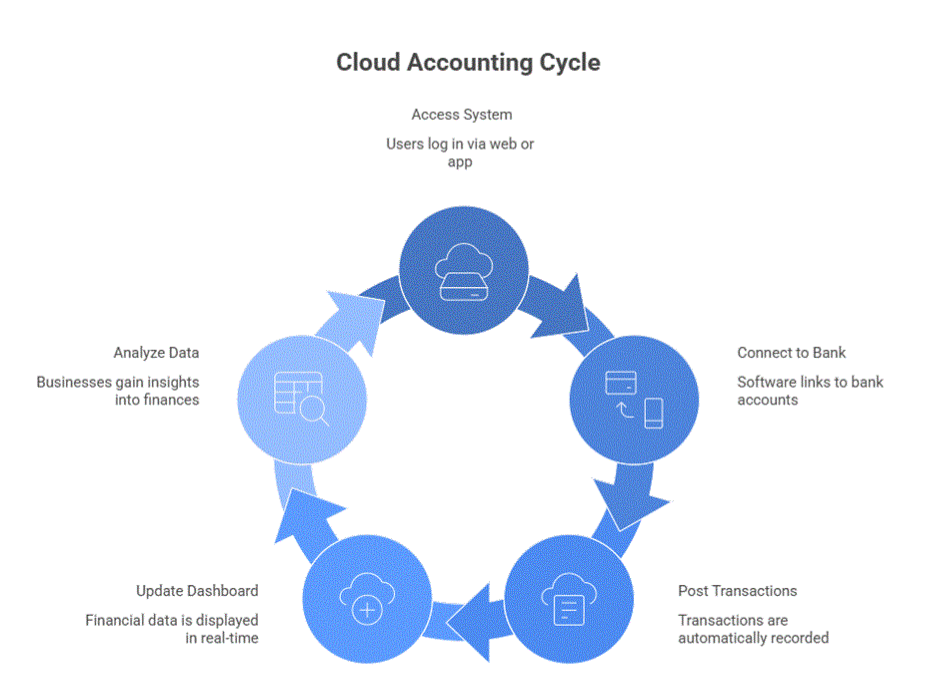
For example, after a customer makes a payment through one of the registered payment gateways and the business needs to record the cash flow statements, the software automatically handles the process. It uses AI to update bank balances and categorize transactions such as rent or supplier payments. It also displays a real-time view of cash inflows and outflows on the dashboard, often eliminating the wait until the end of the month to assess the company’s liquidity.
How does cloud-based accounting benefit small businesses?
- Access to Real-Time Data: By using cloud accounting, you may give your accountant and any bookkeepers access to an account with real-time visibility into your company’s accounting records. When you provide your accountant or bookkeeper access to your account, they will have full visibility of all of your data through security measures, giving them the ability to perform their duties and work with you on an ongoing basis. As a result, this gives you continuous access to your business finances 24 hours a day, 365 days a year.
- Automated Compliance: Cloud-based accounting systems can be continually updated automatically in the background and will continually keep up with any changes (to tax rates or legislation as examples) that will allow the small business owner to devote more energy to building/growing the business without worry about having to change the operation of the small business.
- Staying Audit-ready: Maintain secure, compliant records that are consistently organized and audit-ready throughout the year, reducing stress and the risk of mismanagement during year-round audits.
- Automatic Updates: Cloud accounting systems run on the back end, allowing small business owners to avoid installing manually or requiring the help of IT. This means that you will have access to the most updated tools and compliance information without missing a beat in your daily business activities. As a result, all of the newly released features, bug fixes, and compliance updates can be integrated smoothly, helping to decrease the costs associated with IT updates and supporting continued improvements to the system.
- Scalability: Regardless of whether you have a small business in a local area or a large enterprise that expands through multi-state accounting regulations, cloud accounting systems adjust to your requirements. As businesses are in their growing phase, the cloud system increases proportionally, allowing you to increase the scale of financial entries and management environment, without overhauling the entire system.
- Security: As cybersecurity attacks become rampant, it has become more critical than ever for businesses enable the strongest security systems the best of their abilities. Cloud-based accounting software offers security features like end-to-end encryption, multi-factor authentication, automated backups, and role-based access controls, regardless of a business’s size.

Questions to ask before investing in a cloud-based accounting solution
What are your business’s needs?
Identifying those parts of your business that you will use for automation is critical. This includes and is not limited to, admin tasks, invoices, payroll, analytics, and more. Select a solution that provides all of the options your business requires while also delivering value as your business grows.
What are the costs?
Comparing the pricing of different providers of cloud services is critical when choosing a provider of cloud services. Understanding the pricing of different cloud services will help you make the best choice for your company and find the best way to utilize these services. Also, make sure to review the terms of service (Subscription costs and other fees) prior to making your final decision.
How does the accounting software integrate with other software?
Make sure that the performance management or payroll software currently being used at your organization is compatible with any tools that have been previously implemented. Consult with your service provider on how their software interfaces to other central business applications. Choosing the wrong software option will require your company to undertake the redundant work of transferring data from one format to another, taking up a tremendous amount of time and energy.
How user-friendly is it?
Having a user-friendly interface saves time in training and learning with updates, making it stress-free to use. This is especially true for new employees. It also simplifies onboarding new clients into the system.
Most providers offer free trials and consulting sessions before selling the full version. Choose one with a straightforward user interface that includes all the features your staff needs to work efficiently and makes the process easier for clients.
What Customer Support do they offer?
Cloud-based accounting software often requires assistance while in use. You will want to choose a provider that offers 24 hours a day, 7 days a week support and responds to questions quickly. Search for reviews related to customer service quality and how quickly they resolve issues.
Conclusion
Moving from traditional/manual accounting systems to a cloud-based small business accounting system is the first step many businesses take toward automation. The main goal of this automation is for businesses to regain their autonomy. Because, at the end of the day, the aspect of a business that should receive the most investment, both in resources and time, is the core business operations. Cloud-based accounting makes financial management much easier and more efficient, freeing up more time for core business activities.
Another aspect of cloud-based small business accounting that small businesses can expect from their service provider is that it makes the process of communication and coordination with their designated accountant a lot easier. Many cloud-based accounting software providers provide a dashboard-like visual assistance, which makes it easier for many businesses to communicate their needs and exchange strategies with an accounting professional.